


Premature ticket closure is the quiet reason many service desks look healthy on paper and feel broken in real life. The dashboard says tickets are being closed faster than ever, average resolution time is falling and SLAs are green. Meanwhile the same people keep ringing the help desk about the same problems. If that sounds familiar, your metrics may be measuring speed rather than success.
This guide explains why it happens, how to spot it, what it costs and how to fix it. If you work in IT service management or you’re planning to, it also shows where the ITIL 4 Foundation certification fits in.
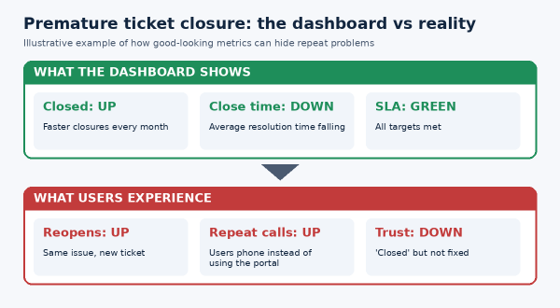
Illustrative example only.
What Is Premature Ticket Closure?
Premature ticket closure means a support ticket is marked resolved or closed before the user’s problem has actually been fixed and confirmed. The issue might have been temporarily masked, passed to another team without follow-up, or simply abandoned after the user didn’t reply fast enough. On the report it counts as a win. For the user it’s an unresolved problem with a fresh queue to join.
It’s rarely malicious. Most agents are working under targets that reward closing tickets quickly, and those targets quietly nudge behaviour in the wrong direction. This is a well-known pattern in measurement: when a number becomes the goal, people optimise the number.
Why Metrics Improve While Users Keep Calling Back
Premature ticket closure persists because the usual service desk metrics don’t punish it. Here are the most common mechanisms.
Resolution-time targets that reward speed over outcomes
When agents are measured on average handling time or time to close, the fastest route to a good score is to close the ticket. A quick workaround, a copied knowledge article or a ‘please try again’ can stop the clock without fixing the cause.
Auto-close rules that treat silence as success
Many tools automatically close a ticket if the user doesn’t respond within a set number of days. That’s a sensible housekeeping rule, but it often hides problems. A user who’s busy, in meetings or tired of chasing isn’t a user whose issue has been solved.
First contact resolution measured at the wrong moment
If first contact resolution is counted when the agent closes the ticket rather than when the user confirms the fix, every premature closure inflates the number. The same applies to customer satisfaction surveys that only reach people who answer, which tends to exclude the frustrated ones.
Workarounds logged as permanent fixes
Restarting a service or clearing a cache might restore access today. If nobody investigates why it failed, the incident returns and a new ticket is opened. Each one looks like a separate success, so the underlying problem never appears in the data.
Warning Signs of Premature Ticket Closure in Your Service Desk
You don’t need a new tool to detect the problem. Look for these patterns in the data you already have:
- A rising reopen rate or many tickets reopened within a few days of closing.
- Repeat contacts from the same user about the same issue within a week or two.
- Duplicate tickets that describe a problem already closed earlier.
- Users phoning instead of using the portal, because they no longer trust the ticket process.
- Satisfaction comments that mention being ‘closed without being asked’ or ‘no one checked’.
- Great SLA numbers alongside rising complaints to managers or leadership.
A mismatch between internal metrics and user feedback is the clearest signal. When both agree, you’re probably fine. When they diverge, trust the people calling you.
The Real Cost of Premature Ticket Closure
The damage rarely shows up on a single report, which is why it lasts. A few of the hidden costs:
- Repeat workload: every callback consumes agent time that a proper first fix would have saved.
- Lost productivity: users wait, work around the issue or abandon tasks.
- Eroded trust: once people believe tickets are closed without being solved, they stop logging them and start escalating informally.
- Shadow IT: frustrated teams find their own tools, which creates security and support risks.
- Agent burnout: staff handle the same problems repeatedly and take the blame for poor outcomes.
Metrics That Expose Premature Ticket Closure
Keep your existing KPIs, but pair them with measures that reflect real outcomes:
- Reopen rate: the share of tickets reopened after being marked resolved.
- Repeat contact rate: users who raise the same issue again within a set window.
- Verified first contact resolution: counted only after the user confirms the fix.
- Customer effort: how hard it was for the user to get the problem solved.
- Post-closure satisfaction: a short follow-up sent a few days after closing.
- Incident recurrence: how often the same incident type returns, which points to problems needing root-cause work.
Professional bodies such as HDI publish widely used research and practice guidance on support metrics, and it’s a useful benchmark when you’re redesigning your reporting.
How to Fix Premature Ticket Closure in Seven Steps
- Separate ‘resolved’ from ‘closed’. Mark a ticket resolved when you believe it’s fixed, and close it only after the user confirms or a reasonable confirmation window passes.
- Require a clear resolution note. Record what was done, why it worked and whether it’s a workaround.
- Confirm with the user before closing. A short message or call asking ‘is this working for you now?’ prevents most callbacks.
- Review auto-close rules. Lengthen the window for complex issues and send more than one reminder before closing.
- Track reopen and repeat-contact rates on the same dashboard as speed metrics.
- Trigger problem management when the same incident keeps returning, so root causes are investigated once instead of patched forever.
- Coach, don’t punish. Review reopened tickets as a team, learn from them and adjust targets that encourage rushing.
How ITIL 4 Helps Prevent Premature Ticket Closure
ITIL 4 doesn’t treat support as a ticket-closing contest. It frames service management around creating value for users, which means the outcome matters more than the number of tickets cleared. Several ITIL 4 practices directly address premature ticket closure:
- Incident management focuses on restoring normal service, not just closing records.
- Problem management finds and removes the root causes behind recurring incidents.
- Service desk emphasises clear communication and a good user experience.
- Continual improvement uses data, including reopen and repeat-contact trends, to improve how work is done.
- Knowledge management keeps solutions accurate so agents aren’t copying out-of-date answers.
You can read more about the framework from its owner, PeopleCert, or explore how the training works through our ITIL certifications overview.
Premature Ticket Closure Across Australian IT Teams
The problem isn’t limited to one industry or city. Whether your service desk is in Sydney, Melbourne, Brisbane, Perth, Adelaide or Canberra, the same targets-versus-outcomes trap shows up. Government teams, universities, managed service providers and internal IT departments all face the pressure to close tickets quickly.
Teams in Hobart and across New Zealand can also join live online classes, so location doesn’t have to limit access to training. See every option on our locations page.
Learn the Skills to Stop Premature Ticket Closure
The fastest way to change a service desk culture is to give people a shared language and practical methods. Our ITIL 4 courses are built for service desk analysts, team leaders, service managers and anyone responsible for support quality.
- ITIL 4 Foundation: the starting point for understanding service value, practices and continual improvement.
- ITIL 4 Managing Professional: for professionals running teams, projects and service delivery.
- ITIL 4 Strategic Leader: for leaders aligning IT with business direction.
Courses are available live online, in-class at physical centres or in-house for your team, with full-time weekday, part-time weeknight and part-time weekend schedules. You can also compare the ITIL 4 Foundation course details and the wider ITIL course range. Want to know more about us first? Visit our about us page.
Premature Ticket Closure FAQs
What causes premature ticket closure?
Usually a combination of speed-focused targets, aggressive auto-close rules, poor confirmation with users and the habit of logging workarounds as final fixes.
How do I measure premature ticket closure?
Track reopen rate, repeat contact rate and verified first contact resolution. If these worsen while average resolution time improves, premature ticket closure is likely.
Is auto-closing tickets always bad?
No. Auto-close is useful when applied carefully, with clear reminders and sensible time windows. The problem is treating a lack of reply as proof the issue is fixed.
What is the difference between resolved and closed?
Resolved means the agent believes the issue is fixed. Closed means the user has confirmed it, or the confirmation window has passed. Keeping the two steps separate is one of the simplest ways to reduce premature ticket closure.
Where can I find answers to other ITIL questions?
Our ITIL certification FAQs answer common questions about exams and courses, and the blog has more service management guides.
Measure Outcomes, Not Just Closures
Good support isn’t about how many tickets you close. It’s about how many problems stay solved. Once you tackle premature ticket closure, the metrics may look a little less flattering at first, but they’ll finally tell the truth, and your users will notice the difference.
Ready to build these skills in your team? Contact us to talk about ITIL 4 training, or start with the ITIL 4 Foundation course.