




SLA pause is the quiet setting inside every service desk tool that stops the clock while a ticket waits on the customer. Used well, it is fair. Used badly, it hides slow support behind a green dashboard. If you have ever watched a ticket sit in “Waiting for Customer” for four days while the monthly report says you hit your target, you already know the SLA pause problem.
This guide explains why tickets stall, what it costs your business, and how to fix it without ruining the fairness the pause was built for. We also cover how ITIL 4 treats service level management, so you can take the ideas straight to your own service desk in Melbourne, Sydney, Brisbane or anywhere else in Australia.
What Is an SLA Pause and Why Does It Exist?
A service level agreement (SLA) sets how fast your team must respond to and resolve a ticket. You can read the general idea in the service-level agreement overview on Wikipedia. The SLA clock starts when the ticket is logged and runs until the issue is resolved.
But some delays are not your fault. If an agent asks the user for a screenshot, an error code or a time to remote in, the ticket cannot move until the user replies. An SLA pause stops the timer during that wait so the service desk is not penalised for something outside its control.
Most tools do this with a status such as “Pending”, “Waiting for Customer” or “On Hold”. Jira Service Management, ServiceNow, Zendesk, Freshservice and BMC Helix all offer a version of it. The idea is sound. The trouble starts when nobody manages what happens inside that status.
The SLA Pause Problem: Where Do the Days Actually Go?
Ask any service desk analyst and you will hear the same stories. A ticket is not slow because the fix is hard. It is slow because it is parked. Here are the most common reasons tickets stay in a paused state for days:
- One-line replies from agents. “Please send more info” with no detail means the user guesses, replies late or replies with the wrong thing.
- Wrong time zone, wrong shift. A user in Perth gets a question at 4:55 pm Sydney time. The answer arrives the next morning, then the agent has gone home.
- Users are not watching email. Many staff never see the notification, especially on shared devices or when the message lands in junk.
- No follow-up rule. Nobody owns the ticket once it is paused, so it sits until the user happens to come back.
- Agents pause to protect the target. Some pause tickets that are not really waiting for the user. This is the part that gives the SLA pause a bad name.
- Unclear ownership across teams. A ticket waits on a vendor or another department, yet it is marked as waiting on the user.
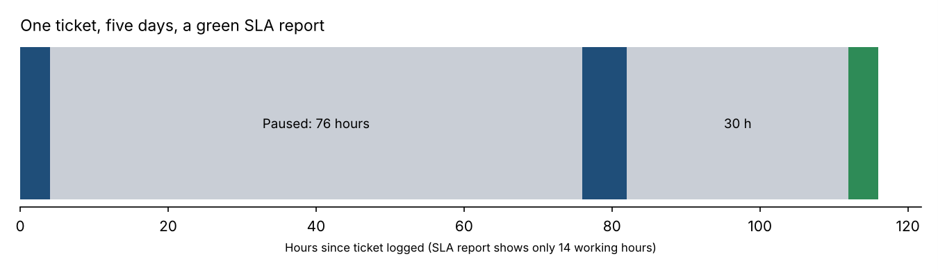
Put those together and a ticket that needed 14 working hours of effort can take five calendar days to close. That is the gap shown in Figure 1.
How a Badly Managed SLA Pause Hurts Users and the Business
The report may look fine, but the people on the other end feel the delay. A staff member who cannot print, log in or open a shared drive is losing paid hours every day the ticket is open.
- Lost productivity. A three-day wait on a password reset or access request can stall a whole project.
- Misleading metrics. If the SLA pause is overused, your compliance rate says 98% while user satisfaction (CSAT) quietly falls.
- Repeat contacts. Frustrated users chase by phone and chat, which adds more tickets to the queue.
- Lost trust in IT. People start to work around the service desk, which leads to shadow IT and security risk.
- Hard conversations at contract time. Customers of managed service providers notice when paused time is far longer than active time.
A Simple Example: The Ticket That Took Five Days
Picture a mid-sized firm with offices in Melbourne and Brisbane. A user logs a ticket at 9:00 am on Monday: their VPN keeps dropping. The agent replies within 20 minutes and asks for the error message. The ticket goes to “Waiting for Customer”, so the SLA pause starts.
The user is in client meetings all day and misses the email. On Tuesday the agent sends a one-line reminder. On Wednesday the user replies with a photo of the wrong screen. The agent asks again. By Friday the real error code arrives and the fix takes ten minutes. The SLA report shows a few working hours. The user remembers five days of a broken VPN.
Nobody broke a rule here. The process simply allowed the SLA pause to hide a communication problem. (This is an illustrative scenario, not a specific client case.)
7 Ways to Fix the SLA Pause Problem
1. Ask better questions the first time
Use ticket templates that request everything in one go: device name, error message, screenshot, when it started and the best time to call. One good first message beats three vague ones.
2. Set automatic reminders
Send a reminder after 4 working hours, again at 24 hours, and a final notice at 48 hours. Use email and chat, and a text message for urgent tickets.
3. Auto-resolve with a clear warning
If the user has not replied after a set period (many teams use 5 business days), close the ticket with a friendly note saying how to reopen it. This stops zombie tickets from inflating your queue.
4. Limit who can use the pause
Restrict the “Waiting for Customer” status to cases where the user truly owes you something. Use separate statuses such as “Waiting for Vendor” or “Waiting for Change Approval” so the SLA pause is only used for user delays.
5. Report paused time as its own number
Track active time and paused time separately. If paused time dominates, you have a process problem, not a user problem. Review the top paused tickets in your weekly team meeting.
6. Offer a faster path
A five-minute remote session or a quick call often solves what ten emails cannot. Give agents permission to pick up the phone.
7. Train your people in service level management
A shared language makes all of the above easier. Teams that understand incident management, service level management and continual improvement design better rules and argue less about them. More on that below.
How to Configure an SLA Pause in Common ITSM Tools
Exact steps change between versions, so check your vendor documentation. In general the approach is the same across platforms:
| Tool | Typical pause trigger | Tip |
| Jira Service Management | Status such as “Waiting for customer” pauses the SLA goal | Add an automation rule to nudge the reporter after 24 hours |
| ServiceNow | SLA definition with pause conditions, for example state is “On Hold” | Use hold reasons so you can report why tickets were paused |
| Zendesk | “Pending” status pauses the clock on some SLA policies | Trigger a reminder macro and an auto-solve rule |
| Freshservice / BMC Helix | “Pending” or custom status with SLA pause settings | Review which statuses are marked as paused every quarter |
What Does ITIL 4 Say About Pausing the Clock?
ITIL 4 does not say “never pause the clock”. It focuses on value: is the user getting a good outcome, quickly? The guidance on incident management, service desk and service level management points teams towards clear targets, honest measurement and continual improvement. You can read more about the framework at PeopleCert, the body that now owns ITIL certification.
Three ITIL ideas help straight away. First, “focus on value” reminds you that a green SLA with an unhappy user is not a win. Second, “collaborate and promote visibility” means paused tickets should be visible to everyone, not buried. Third, “progress iteratively with feedback” encourages you to test a new reminder rule, measure it and adjust.
SLA Pause Metrics Worth Tracking
| Metric | Why it matters |
| Paused time as a share of total ticket time | Shows how much of the user’s wait is hidden from the SLA |
| Average time in “Waiting for Customer” | Highlights slow follow-up and weak first questions |
| Reopen rate after auto-close | Tells you if auto-resolve is too aggressive |
| First-contact resolution | Better first questions mean fewer paused tickets |
| CSAT on tickets with a long pause | Connects the SLA pause to how users really feel |
Build Real Skills: ITIL Training in Australia
If your team keeps fighting about the SLA pause, the fix is rarely a new tool. It is shared understanding. The ITIL 4 Foundation certification gives your service desk analysts and team leaders a common framework for incident management, service requests and service level management. Experienced staff can then step up to the ITIL 4 Managing Professional designation, and senior managers can look at the ITIL 4 Strategic Leader pathway.
You can compare all options on our ITIL certification courses page. Training runs in the following cities and also as live online classes:
- ITIL certification training in Melbourne
- ITIL certification training in Sydney
- ITIL certification training in Brisbane
- ITIL certification training in Adelaide
- ITIL certification training in Canberra
- ITIL certification training in Perth
Not sure which level fits? Read our ITIL FAQs, browse the full list of locations, or contact the team on 1300 649 299 and we will help you choose.
SLA Pause FAQs
What does SLA pause mean?
An SLA pause temporarily stops the service level timer on a ticket while the support team waits for information or action from the user. The timer restarts when the user replies.
Is it fair to pause the SLA clock?
Yes, when the delay is truly on the user’s side. It becomes unfair or misleading when agents use the pause for delays caused by the IT team, a vendor or another department.
How long should a ticket stay in “Waiting for Customer”?
There is no universal answer, but many service desks send reminders at 1 and 2 days and auto-resolve after about 5 business days. Set the rule to suit your users and your risk level, then review it.
Does ITIL 4 allow pausing SLAs?
ITIL 4 is a flexible framework and leaves the detail to each organisation. What matters is that targets are agreed, measured honestly and improved over time. Our ITIL 4 Foundation course covers these principles.
How can I reduce tickets waiting for the user?
Ask complete questions up front, automate reminders, offer a call or remote session, separate waiting reasons, and report paused time as its own metric.
Final Thoughts on the SLA Pause Problem
The SLA pause is not the enemy. It is a fair tool that needs good habits around it. Write clearer first replies, remind users automatically, separate the reasons a ticket is waiting, and measure paused time openly. Do that and your tickets will stop spending days in limbo, and your SLA report will finally match what users experience.
Ready to build those skills across your team? Explore ITIL training in Australia or get in touch today. You can also read more service management advice on the ITIL Certification blog.