




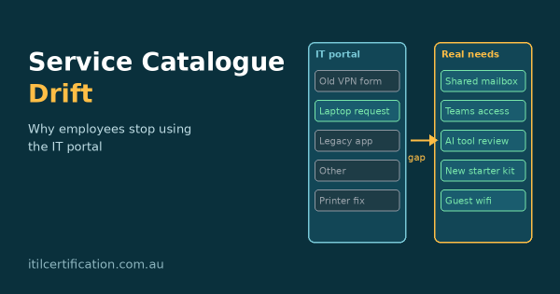
Service catalogue drift is what happens when the list of services in your IT portal slowly stops matching what people actually need, and nobody notices until the tickets dry up. Picture a marketing manager who needs access to a shared mailbox. She opens the portal, scrolls past fourteen forms with names like “Access Provisioning (Tier 2)”, finds nothing that fits, and messages a friend in IT on Teams instead. The request gets done in ten minutes. It also never appears in a single report.
Multiply that by a few hundred staff and you have a portal that looks busy on paper and ignored in real life. This guide explains why employees stop using the IT portal, how to spot the warning signs, and the practical steps that bring your service catalogue back to life, using ITIL 4 thinking in plain English.
What Is Service Catalogue Drift?
A service catalogue is the published list of IT services and offerings that people can ask for. In ITIL 4, the service catalogue management practice exists so that everyone refers to one consistent source of information about services and offerings.
Drift is the slow gap that opens between that catalogue and reality. New tools arrive, teams reorganise, vendors change and old processes quietly disappear, but the catalogue stays frozen. Like a boat without an anchor, it moves a little every week, and eventually it is nowhere near where you thought it was.
Why Employees Stop Using the IT Portal
Nobody wakes up and decides to avoid the portal. They just try it a couple of times, hit friction, and find a faster route. These are the reasons we see most often:
- The catalogue is out of date. Items refer to retired systems, old approval chains or people who left two years ago.
- It speaks IT, not human. Names like “Standard Change – Network Segment” mean nothing to a finance officer who just wants Wi-Fi for a visitor.
- The forms are painful. Fifteen mandatory fields, some of which the system could already know, turn a two-minute request into a chore.
- Search does not work. If typing “new starter” returns nothing, people assume the service does not exist.
- Requests vanish into a black hole. No status updates and no expected timeframe teach staff that email is more reliable.
- It is organised around IT teams, not user goals. People think in tasks like “onboard a contractor”, not in departments like “Infrastructure Services”.
- Shortcuts are tolerated. If a senior leader gets things done by calling someone directly, everyone learns that the portal is optional.
- No one owns it. Without a named owner for each item, nobody notices when a service has changed or stopped being useful.
Warning Signs Your Service Catalogue Has Drifted
You do not need a consultant to spot drift. Check whether any of these sound familiar:
- A large share of tickets are logged as “Other” or “General enquiry”
- Many catalogue items have had zero requests in the last twelve months
- The service desk spends its day re-keying requests that arrived by email, chat or phone
- Staff ask the same “where do I find…” questions again and again
- Fulfilment teams complain that tickets arrive with missing or wrong information
- Portal satisfaction scores are low, or nobody measures them at all
- Teams run their own side channels, spreadsheets or Teams chats to request IT help
The Hidden Cost of an Ignored IT Portal
When people bypass the portal, the damage is easy to miss because it shows up as the absence of data. You lose visibility of real demand, so you cannot staff or plan properly. Service level reports look healthier than they are, because the hardest, slowest work never gets logged. Knowledge stays in people’s heads. Approvals and security checks get skipped when requests arrive through informal channels, which can quietly create risk.
There is a human cost too. Service desk analysts burn out re-entering tickets, and employees quietly conclude that IT is hard to work with. Rebuilding that trust takes far longer than fixing a form.
How to Fix Service Catalogue Drift Step by Step
You do not need a big-bang redesign. Work through these steps in order and review the results every quarter:
- Audit real usage. Pull twelve months of request data. Rank items by volume, abandonment and fulfilment time so you can see what is used, what is ignored and what is missing.
- Talk to the people who avoid it. Run short interviews or a quick survey with staff across departments and ask what they last needed from IT and how they actually got it.
- Rewrite items in plain language. Name services after the task, such as “Set up a new starter”, and add a one-line description of what the person gets and how long it usually takes.
- Retire, merge and add. Remove dead items, combine near-duplicates and add the new services people keep requesting through side channels.
- Shrink the forms. Ask only for what you cannot already know. Pre-fill user, location and manager from your identity system and use smart defaults.
- Show status and set expectations. Give every item a realistic target timeframe and let people track progress without chasing.
- Assign an owner to every item. Each owner reviews their service on a fixed schedule and signs off changes.
- Fix search and connect knowledge. Add synonyms, common typos and links to self-help articles so people can solve simple problems without raising a ticket.
- Meet people where they work. Let staff raise and track requests from Microsoft Teams, Slack or mobile instead of forcing a separate login.
- Close the feedback loop. Add a simple “Was this helpful?” prompt on every item and act on the answers.
Use ITIL 4 guiding principles as a compass
ITIL 4’s guiding principles fit this problem neatly. Focus on value means designing items around what the employee is trying to achieve. Start where you are reminds you to use the data you already have rather than waiting for a new tool. Progress iteratively with feedback supports small, frequent improvements. Keep it simple and practical is the antidote to the fifteen-field form. And collaborate and promote visibility keeps fulfilment teams and users on the same page.
Several ITIL 4 practices work together here: catalogue management, service request management, service desk, service level management and continual improvement. The ITIL 4 management practices list is a handy overview of how they connect.
A Quick Service Catalogue Health Check
Use this table in your next service review to judge how far you have drifted:
| Question | Healthy sign | Drift sign |
| Do item names match user language? | Tasks and goals | Internal jargon and team names |
| Is every item owned and reviewed? | Named owner, quarterly check | No owner, last edited years ago |
| Are tickets logged in the right category? | Few “Other” tickets | Many generic or miscategorised tickets |
| Can staff find items by searching? | Relevant results first time | Empty or irrelevant results |
| Do people see request status? | Updates and clear timeframes | Silence until it is done |
| Is the portal used for most requests? | High adoption, low side channels | Email and chat dominate |
Metrics worth tracking
- Portal adoption rate: the share of requests that arrive through the portal
- Catalogue item usage and abandonment rate
- Search success rate and the most common searches with no results
- Request fulfilment time compared with the published target
- Customer satisfaction after fulfilment
Service Catalogue Challenges Across Australian Cities
Drift looks a little different depending on where and how your people work:
- Sydney: large enterprises and financial services often carry layers of legacy request forms. See ITIL training in Sydney.
- Melbourne: healthcare, education and professional services teams juggle many shared systems. Explore ITIL training in Melbourne.
- Brisbane: fast-growing organisations add new tools faster than the catalogue can keep up. Browse ITIL training in Brisbane.
- Perth: remote and site-based workforces need simple, mobile-friendly request options. Check ITIL training in Perth.
- Adelaide: smaller IT teams need a lean catalogue they can actually maintain. Find ITIL training in Adelaide.
- Canberra: government departments and shared-service providers manage complex approval chains. View ITIL training in Canberra.
ITIL Training to Keep Your Service Catalogue on Track
Fixing drift is partly a tooling job and mostly a service management habit. Teams that share the same language for services, requests, value and improvement find it much easier to keep the catalogue honest. These ITIL certification courses in Australia are a good place to start:
- ITIL 4 Foundation Certification: builds the core vocabulary, the service value system and an overview of every practice, with no formal prerequisites.
- ITIL 4 Managing Professional: for people who run day-to-day service delivery and want to go deeper into practice management.
- ITIL 4 Strategic Leader: for managers shaping how IT aligns with business strategy and value.
Training is available in major cities and live online. Visit the locations page, read the ITIL FAQs, learn about the team, or contact us to choose the right level.
Service Catalogue FAQs
What is a service catalogue in ITIL?
It is a single, consistent source of information about the services an organisation offers, including what each service does, who can request it and how. ITIL 4 covers it as the service catalogue management practice.
What is the difference between a service catalogue and a service portfolio?
The service portfolio covers every service the organisation is considering, delivering or retiring. The catalogue is the subset that is live and available for people to use.
Why do employees bypass the IT portal?
Usually because it is slower or more confusing than asking a colleague. Outdated items, jargon, long forms, poor search and no status updates are the usual culprits.
How often should a service catalogue be reviewed?
Quarterly is a sensible rhythm for most organisations, with owners reviewing their own items and a wider review after any major change in tools or structure.
How do I measure whether the IT portal is working?
Track adoption rate, search success, abandonment, fulfilment time against targets and user satisfaction. Compare them over time rather than judging a single month.
Which ITIL certification covers service catalogue management?
ITIL 4 Foundation gives a brief overview of every practice, including service catalogue management, and higher-level ITIL 4 courses explore how the practices work together in more depth.
Final Thoughts: Bring Your Service Catalogue Back to Life
An ignored IT portal is not a user problem. It is feedback. People are telling you, one workaround at a time, that your catalogue no longer reflects how they work. Start with the data, talk to the people who avoid the portal, write items in everyday words, trim the forms and give every service an owner. Then keep reviewing, because drift is never fixed once and forgotten.
If you want to build these habits across your team, explore ITIL certification in Australia or read more on the ITIL Certification blog.
Sources and further reading
AXELOS: Service catalogue management, ITIL 4 Practice Guide
AXELOS: Reader’s manual, ITIL 4 Practice Guide