



Alert fatigue sets in when monitoring systems send so many notifications that the people receiving them stop trusting any of them. The dashboard is full, the pager buzzes all night, and the one alert that really matters sits buried between forty that did not. Monitoring was meant to protect your services. Somewhere along the way it became background noise.
In this guide we explain why alert fatigue happens, what it costs, and how IT teams can fix it using practical steps and ITIL 4 thinking. If you work in IT operations in Sydney, Melbourne, Brisbane, Perth, Adelaide or Canberra, you can start improving your alerts this week.
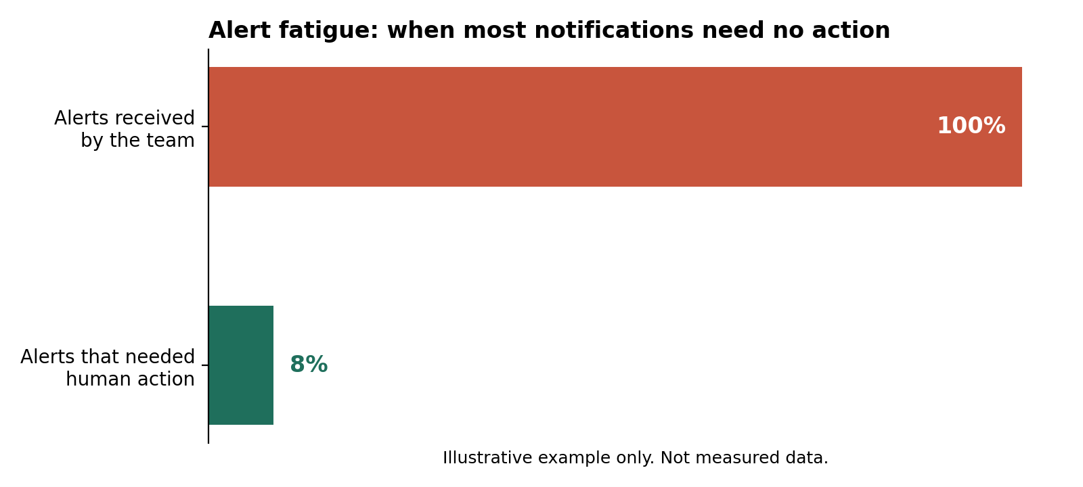
Illustrative example only. Not measured data.
What Is Alert Fatigue?
Alert fatigue is the desensitisation that happens when people are exposed to too many alerts, especially ones that are false, duplicated or impossible to act on. Over time, engineers start to glance, mute and ignore. Response slows down, and real problems slip through.
Google’s Site Reliability Engineering team describes the same pattern: when pages arrive too often, people begin to second-guess and skim them, and they can even miss a genuine page hidden in the noise. You can read that guidance in the Google SRE book chapter on monitoring.
Why Monitoring Systems Create More Noise Than Value
Nobody sets out to build a noisy system. It happens gradually, one reasonable alert at a time. These are the six causes we see most often.
1. Alerts watch causes instead of symptoms
A CPU spike or a full disk might matter, or might not. Alerting on every possible cause creates a flood, while alerting on symptoms that users actually feel keeps the signal clean.
2. Thresholds are never tuned
Default settings rarely match how your services behave. A threshold set during a project launch can trigger daily for years because nobody revisits it.
3. One incident creates an alert storm
A single failure can trigger dozens of related alerts across systems. Without grouping or correlation, the on-call engineer sees forty problems instead of one.
4. Nobody owns the alert
If an alert has no named owner and no runbook, it is easy to ignore and hard to fix. Orphaned alerts pile up quietly.
5. Everything is treated as urgent
When every notification goes to the same channel with the same priority, people cannot tell a critical outage from a minor warning.
6. Tools are added but never retired
New monitoring tools arrive with each project, yet old rules stay switched on. Over time the total volume grows and the value per alert shrinks.
The Real Cost of Alert Fatigue
The damage goes well beyond annoyance. Alert fatigue carries risks that reach the whole business.
- Missed critical incidents: a real outage hides among false alarms and waits longer for attention.
- Slower response: engineers hesitate, double-check or ignore alerts, so recovery takes longer.
- Burnout and turnover: broken sleep and constant interruptions push skilled people to leave.
- Wasted effort: time spent triaging noise is time not spent improving services.
- Weaker customer trust: longer outages and repeated issues damage the relationship with users.
Alert, Event and Incident: Know the Difference
Part of the problem is vocabulary. ITIL separates three ideas that teams often mix together.
- Event: any change of state that matters to managing a service. Most events are routine and need no action.
- Alert: a notification that an event or condition needs attention.
- Incident: an unplanned interruption to a service, or a reduction in its quality.
Healthy monitoring turns thousands of events into a small number of meaningful alerts, and only a few of those become incidents. Alert fatigue appears when that filtering breaks down.
Warning Signs of Alert Fatigue
Look for these signals in your team and your tools.
- Engineers mute channels or filter alert emails into folders.
- Most alerts are closed with no action taken.
- The same alert fires repeatedly with no fix or change.
- On-call staff dread their shifts, and people swap rosters to avoid them.
- Incidents are discovered by customers before the monitoring system flags them.
How to Reduce Alert Fatigue: 7 Practical Steps
You do not need to replace your tools. You need to be more selective about what interrupts a human.
- Audit your alerts. Review the last 30 to 90 days. List every alert, how often it fired and whether anyone acted on it.
- Apply a simple test. Google’s SRE guidance suggests a page should be urgent, important, actionable and real. If an alert fails that test, it should not wake anyone.
- Alert on symptoms and service levels. Focus on what users experience, such as errors, slow responses or missed service level targets.
- Set severity levels and routing. Send critical alerts to on-call staff, route lower priorities to tickets and keep informational events on dashboards.
- Group and deduplicate. Correlate related alerts so one incident produces one clear notification.
- Add owners and runbooks. Every alert should say who owns it and what to do next.
- Review monthly and retire alerts. Treat alert quality as a continual improvement activity, and delete rules that no longer earn their place.
Alert Severity Guide
Use this table as a starting point for deciding how each alert should reach your team.
| Severity | Example | Expected response | Channel |
| Critical | A customer-facing service is down | Respond immediately and page on-call | Pager or phone |
| High | Performance degraded and a service target is at risk | Respond within the hour | Chat plus ticket |
| Medium | A resource is trending toward its limit | Fix within the working day or week | Ticket |
| Low or info | Routine events and completed jobs | No action, review trends later | Dashboard or log |
How ITIL 4 Helps Reduce Alert Fatigue
ITIL 4 gives teams a shared language and a set of practices that tackle noise at its source. Monitoring and event management defines how events are detected and classified. Incident management ensures that real disruptions get a fast, structured response. Problem management goes after the root cause of recurring alerts instead of acknowledging the same one every week.
Service level management keeps alerts tied to what the business actually cares about, while continual improvement gives you a regular rhythm to prune and tune. The PeopleCert organisation oversees the ITIL certification scheme if you want to understand the wider framework.
Alert Fatigue Training Across Australian Cities
IT operations teams in every capital face the same noise problem, though the industries behind them differ.
- Sydney: finance and enterprise teams run large, complex monitoring estates. See our Sydney training options.
- Melbourne: a big market for IT operations, service desk and ITSM roles. Explore Melbourne.
- Brisbane: growing technology and infrastructure teams need clear incident processes. Visit Brisbane.
- Perth: resources and engineering firms depend on reliable operational technology and IT. See Perth.
- Adelaide: defence, health and public sector services need dependable monitoring. Check Adelaide.
- Canberra: government departments rely on well-governed service management. Read about Canberra.
Compare every option on our locations page. Live online training is also available across Australia.
Build ITSM Skills to Tame Alert Fatigue
Fixing noisy monitoring takes process skills as well as tool tweaks. Our ITIL courses help you manage services, incidents and improvement in a structured way.
- Start with the basics: the ITIL 4 Foundation Certification introduces the Service Value System and core practices such as incident management, problem management and change enablement.
- Step up: the ITIL 4 Managing Professional Designation builds practical service management skills.
- Lead the change: the ITIL 4 Strategic Leader pathway suits managers shaping how IT supports the business.
Browse all ITIL certifications, learn more about us, read the blog, check the FAQs or contact our team on 1300 649 299.
Alert Fatigue: Frequently Asked Questions
What is alert fatigue in IT operations?
It is the state where teams receive so many alerts, many of them false or low value, that they start to ignore or delay their response to all of them, including the important ones.
What causes alert fatigue?
Common causes include untuned thresholds, alerts on causes instead of symptoms, duplicate alerts from one incident, missing owners and treating every alert as urgent.
How do you reduce alert fatigue?
Audit your alerts, keep only those that are urgent and actionable, alert on user-facing symptoms, group related alerts, add runbooks and review the rules regularly.
Does ITIL help with alert fatigue?
Yes. ITIL 4 practices such as monitoring and event management, incident management, problem management and continual improvement give teams a clear structure for filtering noise and fixing root causes.
Final Thoughts
Alert fatigue is not a sign that your team is careless. It is a sign that your monitoring grew faster than your discipline. Keep only the alerts that deserve a human, give each one an owner and a next step, and review them often. Ready to build the skills to lead that change? Explore our certifications today.