


Ticket ping-pong is the quiet productivity killer sitting inside almost every IT service desk. A user logs what looks like a simple request, say a shared mailbox that won’t open, and over the next three days it travels from the service desk to the infrastructure team, back to the service desk, across to the applications team, and then, somehow, lands in the lap of the person who first looked at it. Nobody was lazy. Nobody was careless. The request still bounced around like a ball nobody wanted to hold.
If that sounds familiar, you’re in good company. In this guide we’ll unpack why IT requests keep bouncing between support teams, what ticket ping-pong really costs your business, and the practical, ITIL 4-aligned steps that stop it. Whether you run a service desk in Melbourne, manage operations in Sydney, or you’re simply tired of explaining to users why their ticket has had four owners this week, there’s something here for you.
What Is Ticket Ping-Pong in IT Support?
Ticket ping-pong (also called ticket bouncing, ticket tennis or the reassignment loop) describes what happens when an incident or service request is passed back and forth between support groups without anyone actually resolving it. Each handoff looks reasonable in isolation. Add them all up and the user has waited days for something that needed twenty minutes of focused work.
It’s closely tied to a handful of terms you’ll hear in IT service management (ITSM) circles: the hop count (how many times a ticket changes assignment group), the reopen rate, first-contact resolution and mean time to resolve (MTTR). When ticket ping-pong is present, all four tend to drift in the wrong direction at the same time.
Why IT Requests Keep Bouncing Between Support Teams
There’s rarely a single villain. Ticket ping-pong is almost always the by-product of several ordinary design flaws stacking up on top of each other. Here are the six we see most often.
1. Vague Categories and Sloppy Triage
If “Other” is the most popular category on your ticket form, the request is already off to a bad start. Something logged as “Network” that is really an access permission issue lands in front of the wrong engineers, who will, quite reasonably, send it back.
2. Nobody Clearly Owns the Ticket
In many service desks, “ownership” just means whoever’s name is on the assignment field right now. That’s not ownership, that’s custody. When no single person is accountable from logging to closure, every team optimises for getting the ticket off its own queue.
3. Siloed Support Tiers and Unclear Handoff Rules
Tiered support (L1, L2, L3) works when each tier knows exactly what it must try before escalating and what the next tier needs to receive. Without clear operational level agreements (OLAs), escalation becomes a polite word for passing the buck.
4. Missing Information and Thin Documentation
Every time a resolver has to ask “which device?”, “what error message?” or “when did it start?”, the ticket stalls, and it often gets reassigned while it waits. Weak knowledge articles make things worse because the second team can’t see what the first one already tried.
5. Routing Rules That Read Keywords, Not Context
Automated routing is great until a rule sends every ticket containing the word “email” to the messaging team, including the phishing report, the printer scan-to-email fault and the broken Outlook add-in. Routing rules that nobody reviews age badly.
6. Metrics That Reward Closing, Not Solving
If a team is measured on tickets closed or time to first response, reassigning is the cheapest way to hit the number. In that sense, ticket ping-pong isn’t a malfunction. It’s the system doing exactly what it was designed to do.
The Real Cost of Ticket Ping-Pong
The damage goes well beyond a few annoyed users. Left alone, ticket ping-pong quietly drains time, money and goodwill:
- Slower resolution. Every handoff adds queue time, re-reading time and context-switching time.
- Higher cost per ticket. Three analysts touching one issue costs roughly three times the effort of one analyst solving it.
- Frustrated analysts. Nobody joins a service desk hoping to forward tickets all day. Constant bouncing feeds burnout and turnover.
- Lost trust. Users stop logging tickets and start walking over to a favourite engineer’s desk, which creates shadow support and zero visibility.
- Hidden risk. A security incident disguised as a routine request can sit in the wrong queue for days.
- SLA breaches. The clock keeps running while a ticket changes hands, even if no one is actually working on it.
How to Spot Ticket Ping-Pong in Your Service Desk
You don’t need fancy analytics to find it. Pull a month of closed tickets and look for these warning signs:
- Tickets reassigned more than twice before resolution
- Tickets that end up back with the group that first received them
- A high reopen rate or repeated “still not fixed” follow-ups from users
- Low first-contact resolution on common request types
- Long stretches in “waiting” status compared with time actually being worked
- Specific categories that account for a disproportionate share of reassignments
Platforms such as ServiceNow track reassignment counts natively, and most other ITSM tools can report on the same thing with a little configuration. Once you can see the pattern, you can fix it.
How to Fix Ticket Ping-Pong: 8 Practical Steps
- Tighten your categories. Replace vague options with a short, plain-language list tied to real resolver groups. Fewer, clearer choices beat a 60-item dropdown.
- Assign one accountable owner. The owner stays the same even when the work moves. Think of the service desk analyst as the ticket’s case manager, responsible for chasing it to the end.
- Write clear handoff rules. Define what “ready to escalate” means: the diagnostics collected, the steps already tried and the user details confirmed. Incomplete escalations go back to the sender with a reason, not into a black hole.
- Cap the hops. After the second reassignment, route the ticket automatically to a team lead or incident manager who decides the next move. That single trigger breaks a surprising number of loops.
- Swarm the tricky ones. For complex incidents, bring the right people together at the same time instead of passing the ticket along in sequence.
- Build knowledge as you go. Capture the fix when the ticket closes so the next analyst doesn’t start from scratch.
- Review routing rules quarterly. Treat them like code: test, tweak and retire what no longer works.
- Measure what matters. Track reassignment count, first-contact resolution and user satisfaction alongside SLA compliance, so teams aren’t rewarded for simply moving tickets along.
How ITIL 4 Helps Stop Ticket Ping-Pong
ITIL 4 won’t hand you a magic routing table, but it gives your teams a shared language and a set of practices that tackle the root causes. The ITIL 4 Incident Management practice, for example, is built around minimising the negative impact of incidents by restoring normal service as quickly as possible, which is a pretty good antidote to a ticket that spends its life in transit.
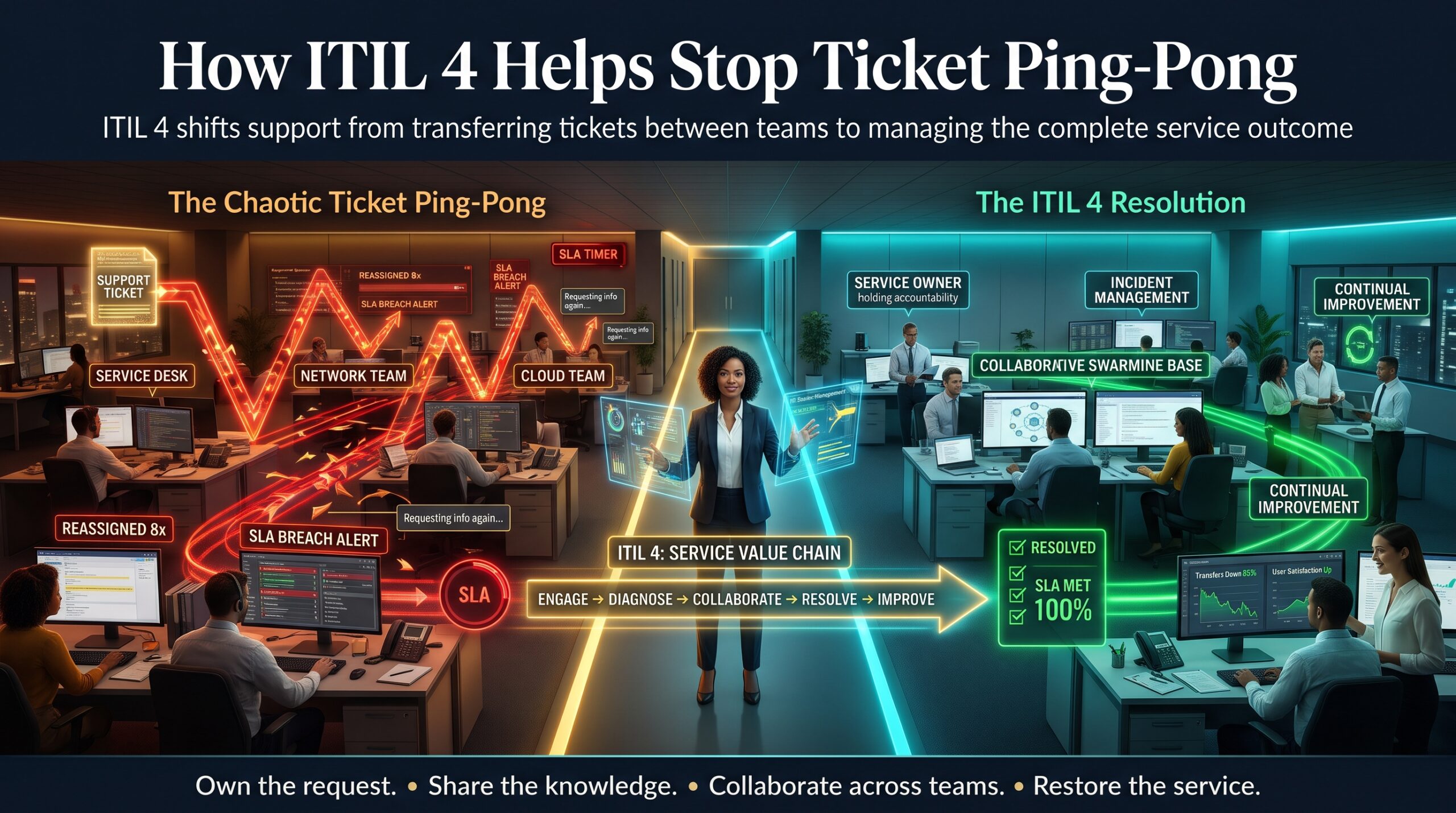
A few other ITIL 4 practices matter just as much when you’re trying to end ticket ping-pong:
- Service desk: a single, well-run point of contact that owns the user experience from start to finish.
- Service request management: standard, repeatable fulfilment for the routine stuff, so it never needs to be “routed” at all.
- Problem management: finding and removing the root cause of recurring incidents, so the same ticket stops bouncing every fortnight.
- Knowledge management: making sure what one analyst learns is available to the next.
The ITIL guiding principles help too. “Collaborate and promote visibility” and “think and work holistically” speak directly to the siloed thinking behind most reassignment loops. As one Paessler guide to ITIL incident management points out, escalation itself isn’t the enemy. Mature teams escalate all the time. The trouble starts when escalation is unstructured. Likewise, CIO Insight’s overview of ITIL incident management highlights that the whole point of a structured process is getting each ticket in front of the right person with the right priority.
If you’re new to the framework, our ITIL 4 Foundation certification is the natural starting point, and you can explore every pathway on our ITIL certification courses page.
Ticket Ping-Pong Across Australia: Melbourne, Sydney, Brisbane and Beyond
Service desks look different in every city, but the problem is remarkably consistent. Teams supporting government and shared-services environments in Canberra often juggle layers of ownership. Large financial and professional services organisations in Sydney and Melbourne tend to run multi-vendor support models where handoffs multiply. Resources and infrastructure businesses in Perth frequently depend on remote and outsourced resolver groups. And across Brisbane and Adelaide, growing IT teams are often stretched thin enough that clear escalation rules rarely get written down.
Wherever you’re based, structured ITIL training gives your analysts and managers a common playbook. Our instructor-led courses run in Adelaide, Brisbane, Canberra, Melbourne, Perth and Sydney, as well as live online across Australia. See all ITIL training locations to find the best fit for your team.
ITIL Courses That Help You Fix Ticket Ping-Pong
Ready to move from diagnosing the problem to solving it? These certification pathways are a good place to start:
- ITIL 4 Foundation: ideal for service desk analysts, support engineers and anyone new to ITSM. It introduces the Service Value System and the core practices behind incident, request and problem handling. No formal prerequisites are required.
- ITIL 4 Managing Professional: designed for team leaders and managers who want to run smoother, more predictable IT operations and stop recurring handoff problems at the process level.
- ITIL 4 Strategic Leader: for senior leaders who want to connect IT service delivery with business strategy and build a culture of shared ownership.
Still not sure which track suits you? Browse our FAQs, read more on the ITIL Certification blog, or learn about us.
Ticket Ping-Pong FAQs
What is ticket ping-pong in IT?
Ticket ping-pong is when a support ticket is repeatedly reassigned between teams or individuals without being resolved, leading to delays, repeated questions and frustrated users.
Why do IT tickets get reassigned so often?
The usual culprits are unclear categories, no single ticket owner, weak escalation rules, missing documentation and routing rules that match keywords instead of context.
How many reassignments are too many?
There’s no universal number, but many teams treat more than two reassignments as a signal worth reviewing. The aim isn’t zero, since some handoffs are genuinely necessary. It’s making each handoff deliberate.
Can ITIL certification reduce ticket reassignments?
Yes. ITIL training gives teams shared definitions and structured practices for incident management, service desk operations, knowledge and problem management, which directly address the causes of unnecessary handoffs.
Do I need experience to take ITIL 4 Foundation?
No. There are no formal prerequisites, so it suits both beginners and experienced IT professionals.
Final Thoughts: Stop the Game and Start Resolving
Ticket ping-pong isn’t a people problem. It’s a design problem, and design problems can be fixed. Clear ownership, sharper categories, structured handoffs and a culture that rewards solving over shuffling will take you a long way. Add the common language of ITIL 4 and the change tends to stick.
Ready to take the next step? Contact our team or call 1300 649 299 to find the right ITIL course for you or your service desk.